I’ve had a Home Assistant Lovelace dashboard running for years on a small Samsung tablet located in the kitchen. It uses Fully Kiosk to wake up the display on motion, keeping the screen on for 5 minutes. The dashboard includes a number of tabs, including various home stats, camera feeds, and a rotating family photo. While nice, it’s just not big enough.
Determining the approach for a large display
I investigated the typical approach of combining a Pi with a monitor, but really needed the touchscreen capability as no single screen could fit all the various information. A Pi in my experience is not that reliable, and no longer a cost effective option, let alone all the time to implement the system.
What was needed is simply a larger Android tablet. Sure enough, these exist. I embarked on an extensive AI assisted research effort to identify sources. Some of the key requirements included:
– Cost
– Display Size: appx 24″ to fit underneath a kitchen cabinet area.
– Resolution: at least 1920×1080.
– Touchscreen
– Front Camera: a minimalist camera for motion detection only.
– Auto-rotate sensor for portrait and landscape mode.
– Wall mount capable.
– Bezel: minimal
Large Android Tablets
The first candidate to make the shortlist was Monsview and their Android tablet line. They advertised a 2 unit MOQ (minimum order quantity) and reasonable shipping cost (<$50). However, the company is geared toward custom offerings only, and trying to communicate and ratify specifications proved too difficult. Further, the advertised shipping cost was misleading, as it only applied to slow boat shipping, which they didn’t even advise. Moving on.
After churning through more suppliers, I came across the KTC Megapad line. Off-the-shelf offerings up to 32″, a warehouse in the US, and a presence on Amazon. I contacted the company with a bunch of questions, including whether it could be wall mounted. They were quite responsive. It has a kickstand to prop it up, but unfortunately it is not removable. However, it met all the other requirements. I decided to give this a try for the kitchen alcove location. I ended up purchasing the 25″ Megapad direct for $352 and received it in less than a week.
Megapad Setup
The Megapad packaging is excellent.
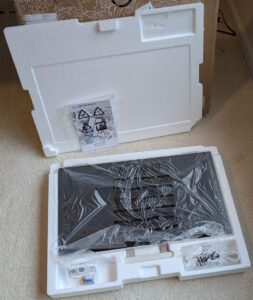
It comes fully encased in a custom styrofoam clamshell. There were no mars on the frame or screen.
I plugged it in with the included adapter and let it charge for a couple of hours. Power up and Android setup is straightforward. I chose to make the fonts as small as possible, and reduced the brightness to 45%. Screen timeout is used by Fully Kiosk and was set to 5 minutes.
Fully Kiosk Setup
Install Fully Kiosk from the play store.
Fully Kiosk setup is a bit more involved, here are the configuration steps I used.
Start Url: enter the Lovelace dashboard url. `http://192.168.0.11:8123/lovelace/0
Full Screen Mode: On (default)
Start Using Fully
Enter your Home Assistant login.
Stay logged in Yes
Configure the kiosk further by dragging from left edge to get to the kiosk menu.
Settings
Motion Detection (PLUS)
Enable visual motion detection
Turn Screen On on Motion It will go on on camera movement detection and off based on the time set for the screen timer.
Device Management
Screen Off Timer (PLUS): 300
Launch on boot: On
web auto reload
Auto Reload after Page Error: 60
Done. Drag from left to go back to main menu.
Goto Start URL
Permission prompt. Allow everything. Then Activate this device admin app
Now shows list of Display over other apps. Choose Fully Kiosk, enable. Click back arrow.
Buy a License
Swipe from left side, get a plus license.
Enter your email address to buy. Order Now
Now shows a GooglePlay dialog. Buy. Enter google pwd, Verify.
Screen shows Activating license, followed by a confirmation dialog. It sends a confirmation email too.
Close returns to the kiosk HA dashboard and the nag watermark is gone.
Home Assistant Dashboard
The large display is definitely nice. The rotating photo display is much easier to see from a distance.
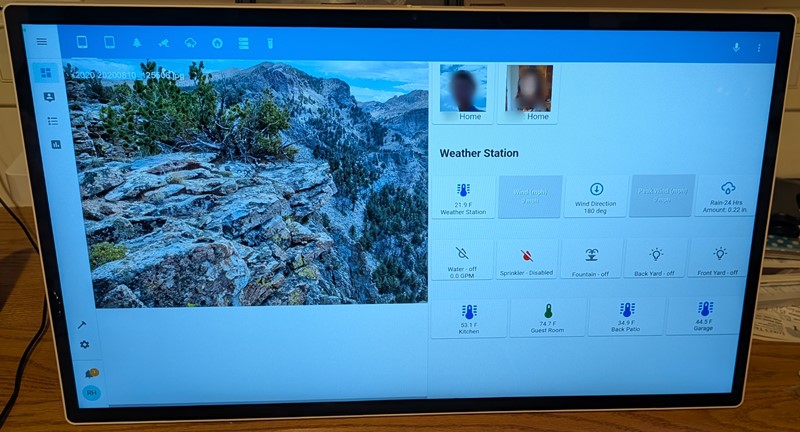
I’ll likely tweak the various sensor indicators to better utilize the space, but for now it’s fine.
It remains to be seen what the long term reliability is. It comes with a 1 year warranty.
Parameters for the ideal mega tablet
Overall, the megapad is an excellent choice for the Home Assistant dashboard. It’s really nice to have the large screen size. For a table top application using the kickstand, I’d have no reservations selecting it.
There are however several shortcomings.
There is no wall mount capability. It comes with a handle that could be used to hang it, but that would be ugly. A vesa or alternate back mount scheme is the most significant shortcoming.
The power cord plugs into the left side and is a visible eyesore. It should connect in the back, out of sight.
There are also some modifications which would reduce the cost. It comes with a remote control, which isn’t needed in this application. Only a minimalist camera is needed for motion detection. Similarly, a minimalist battery is all that is required as this will be powered continuously.